If you have forgotten or lost access to your KNEC CBA Portal Password, you can reset your password to regain access to your registered account. Resetting the password allows you to create new login credentials and continue accessing the CBA services available through your school or assessment centre account.
This guide explains how to reset your KNEC CBA Portal Password online using the official KNEC CBA Portal. The process involves accessing the KNEC CBA login page, selecting the password reset option, providing the required account details, and following the instructions provided to create a new password.
READ ALSO: How To Log In To KNEC CBA Portal
What is KNEC CBA Portal Password?
The KNEC CBA Portal Password is a security credential used together with a registered Email or Centre Code to access a KNEC Competency Based Assessment account. The password helps protect the account from unauthorized access and ensures that only authorized school users can access the CBA services and information available through the portal.
The KNEC CBA Portal Password is entered on the KNEC CBA Portal login page when signing in to a registered account. Users should keep their password confidential and use the correct password when accessing the portal. If the password is forgotten, the user can follow the available password reset process to create a new login password.
What is KNEC CBA Portal Password Reset?
KNEC CBA Portal Password Reset refers to the process of changing or recovering the password used to access a registered KNEC Competency Based Assessment account. The password reset process is useful when an authorized user has forgotten their current password or is unable to log in to the KNEC CBA Portal using their existing login credentials.
The KNEC CBA Portal Password Reset process allows the user to regain access to their account by following the password recovery instructions provided through the official KNEC CBA Portal. Once the reset process is completed successfully, the user can use the new password together with their registered Email or Centre Code to log in to the KNEC CBA Portal.
Requirements Needed To Reset KNEC CBA Portal Password
To reset your KNEC CBA Portal Password, you need the details associated with your registered KNEC CBA Portal account. The Centre Code/SCDE Code is required to identify the school or assessment centre, while the registered Phone Number is used to receive the OTP during the password reset process and email address is required to receive the password reset link. The requirements needed to reset KNEC CBA Portal Password are:
- Centre Code/SCDE Code
- Registered Phone Number
- Email Address
Once you have your Centre Code/SCDE Code, access to the Registered Phone Number and email address registered on CBA Portal ready, you can proceed to reset your KNEC CBA Portal Password. The process involves entering the required centre details, verifying your account using an OTP sent to your registered phone number, and following the password reset instructions provided by the portal.
How To Reset KNEC CBA Portal Password
With your Centre Code/SCDE Code and access to your Registered Phone Number ready, you can begin the process of resetting your KNEC CBA Portal Password. The process involves accessing the password reset option, entering the required details, verifying your account using the OTP sent to your registered phone number, and following the instructions to create a new password. Follow the steps below to reset KNEC CBA Portal Password:
- Step 1: Visit KNEC CBA Portal
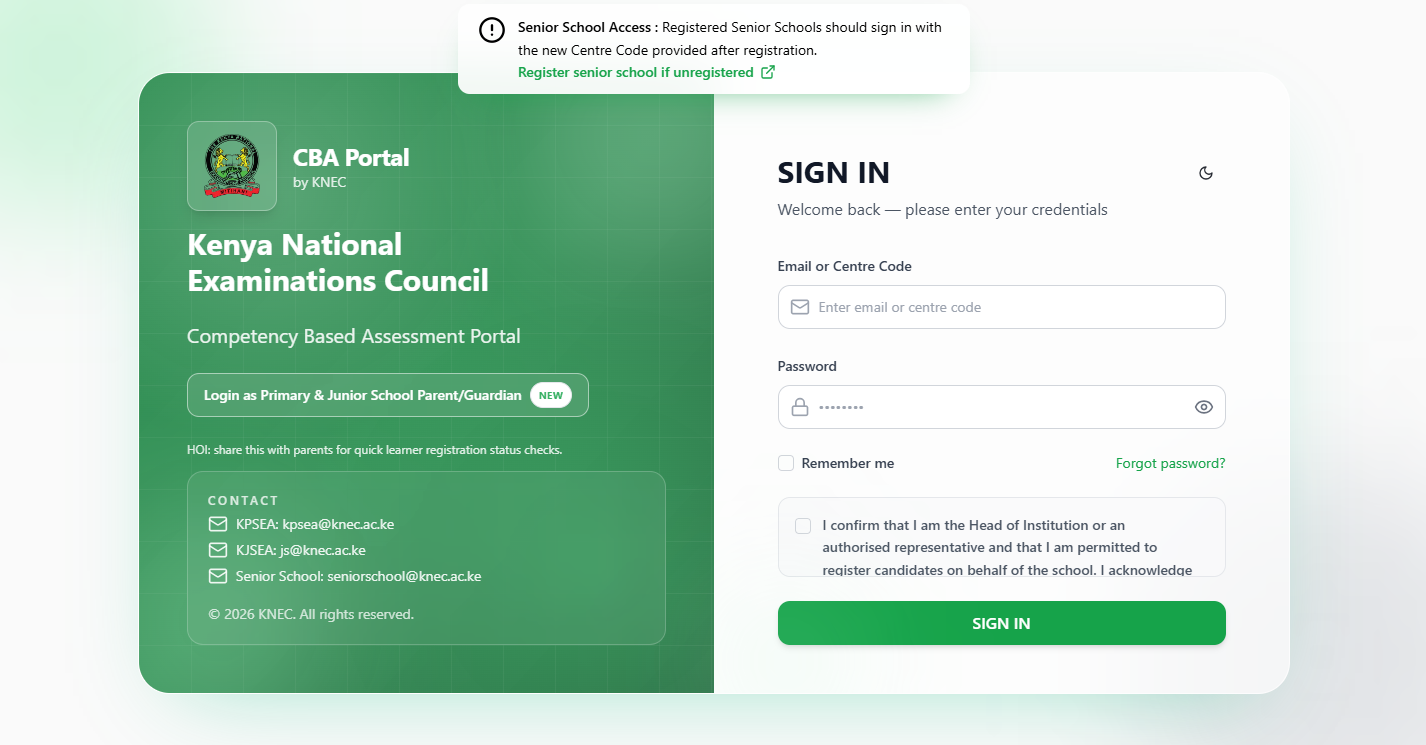
To be able to successfully reset KNEC CBA Portal Password online, the first thing that you need to do is to visit the CBA Portal using https://cba.knec.ac.ke
- Step 2: Click Forgot Password
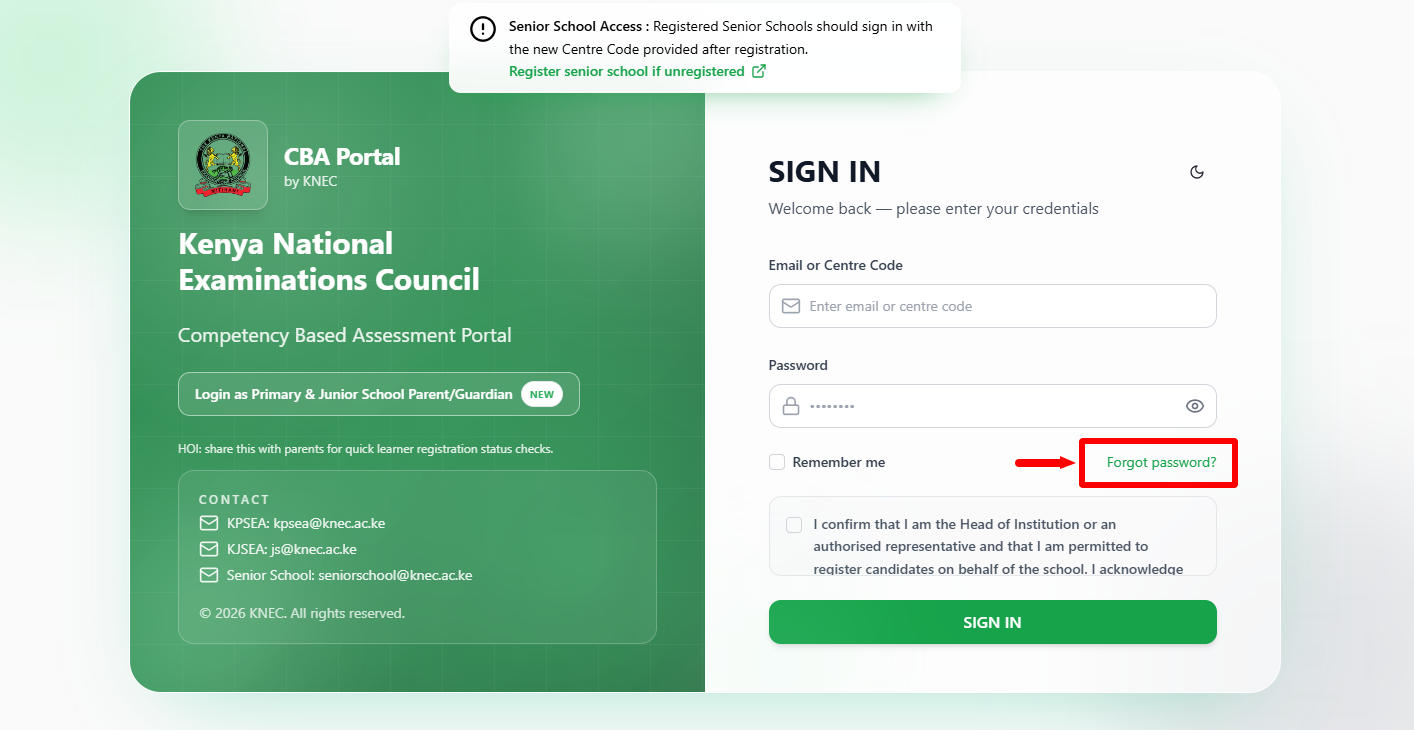
Once you are on KNEC CBA Portal, click on the “Forgot Password” link to start the process of CBA Portal password reset online.
- Step 3: Enter Centre Code or SCDE Code
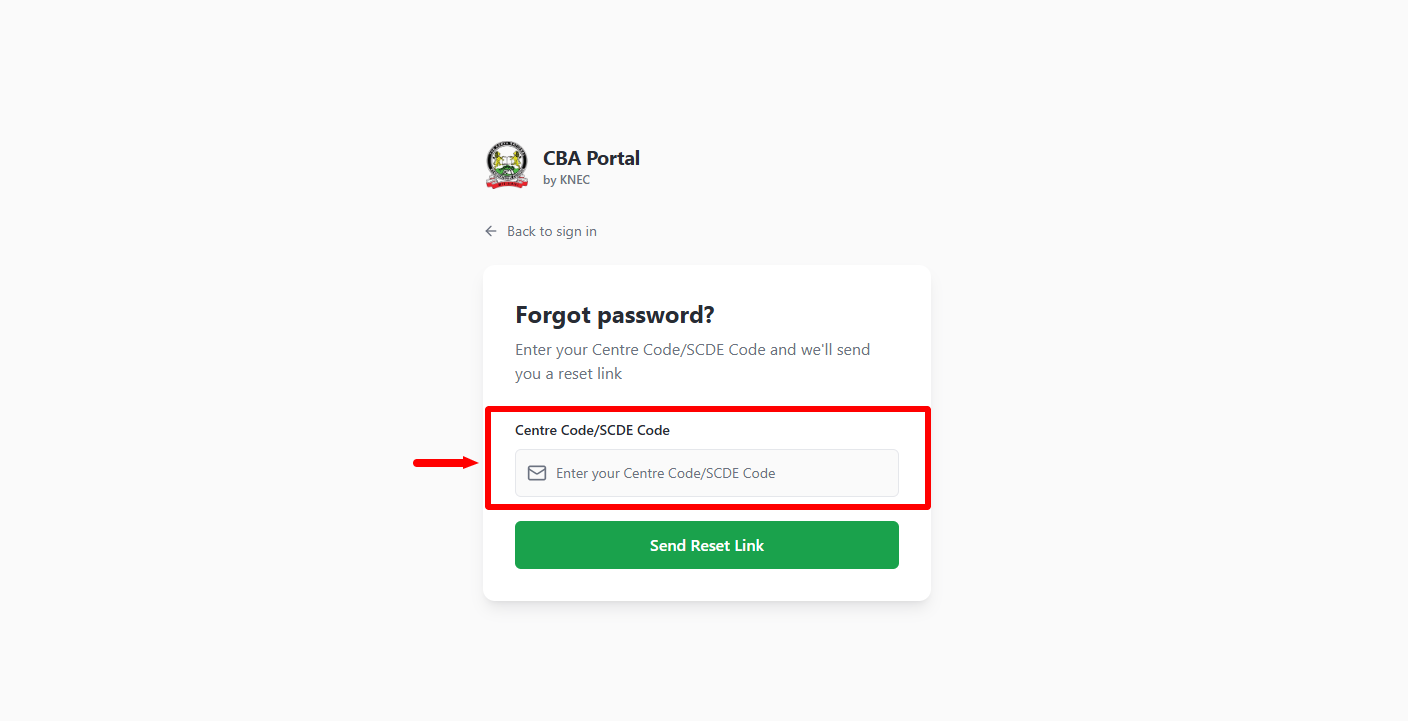
In this step, you need to enter the “Centre Code” or “SCDE Code” so as to be able to receive the CBA Portal password reset link. Once you have entered the Centre Code or SCDE Code, proceed to the next step.
- Step 4: Click Send Reset Link
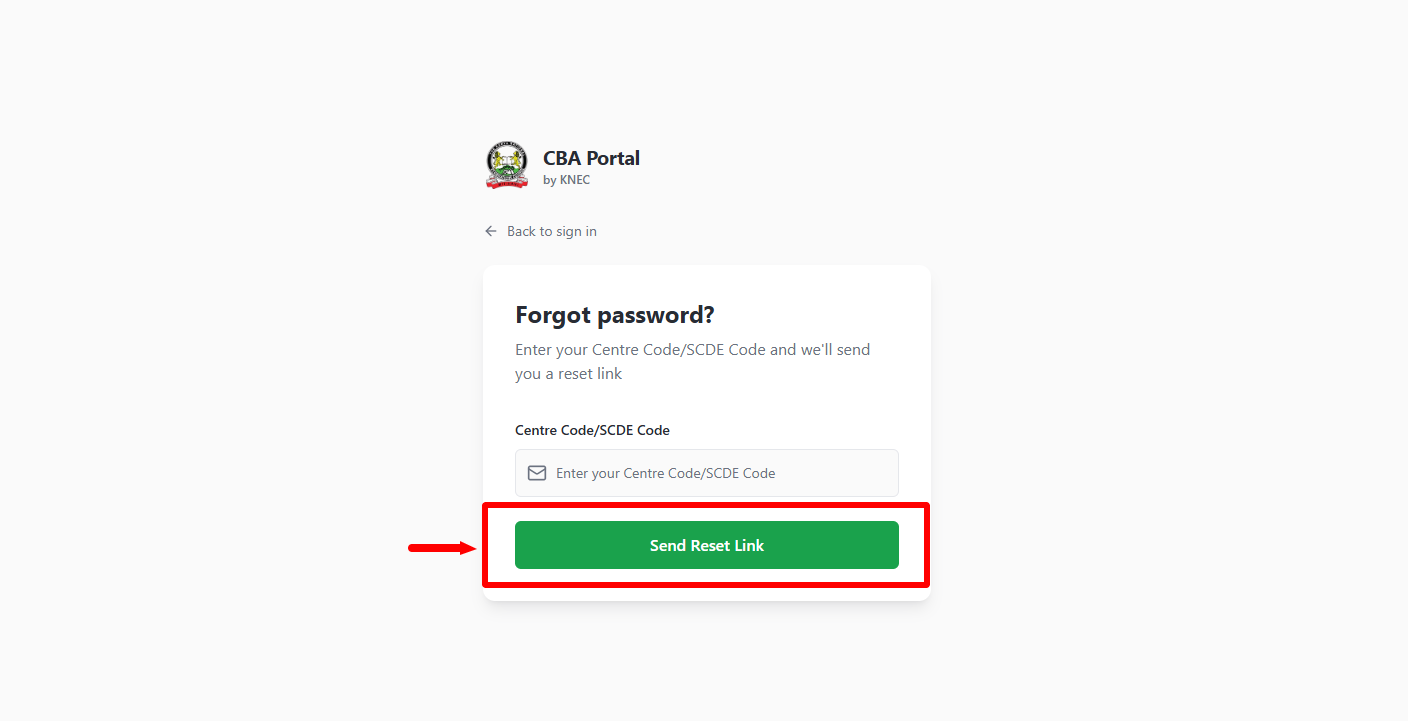
Once you have entered the Centre Code or SCDE Code, click on the “Send Reset Link” button to initiate the CBA Portal password reset process.
- Step 5: OTP Verification
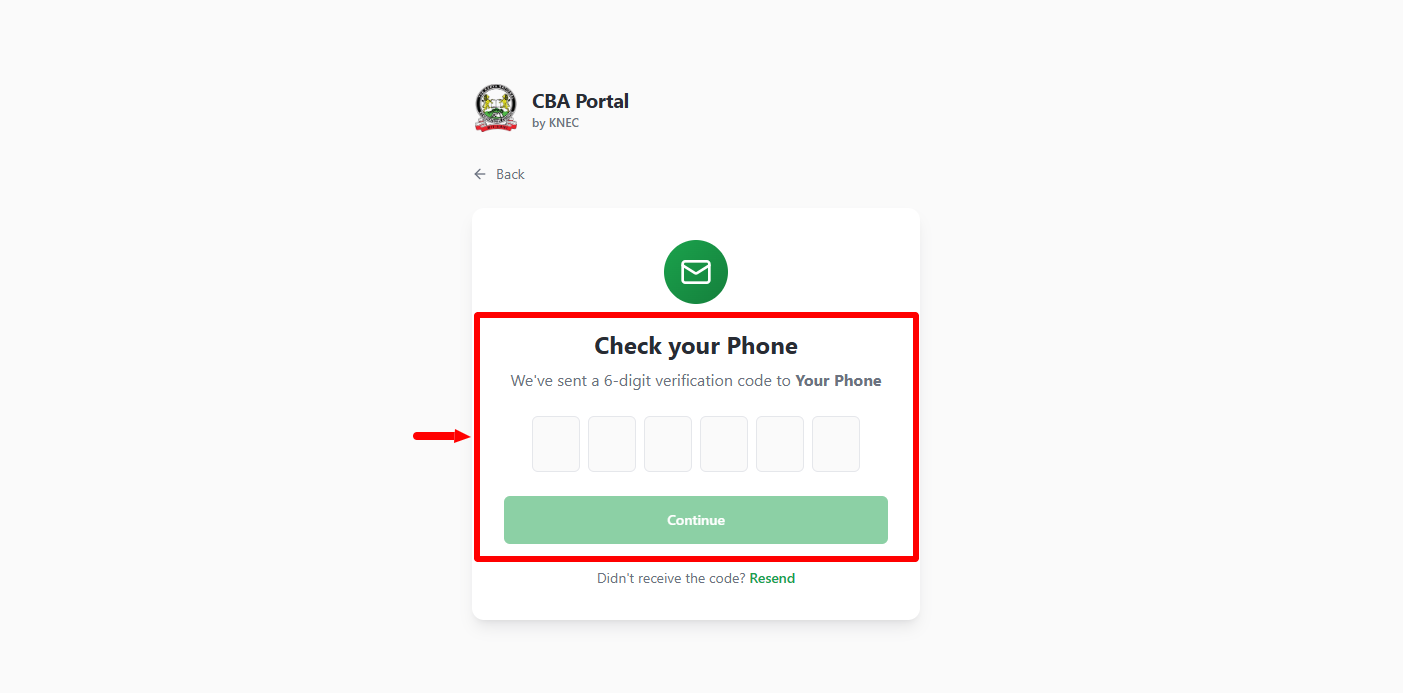
In this step, you need to check your phone number for the 6 digit OTP verification code that has been sent there. Once you have entere the OTP verification code, click on “Continue” button. Proceed and check your registered email address for the password reset link that has been sent there.
- Step 6: Reset KNEC CBA Portal Password
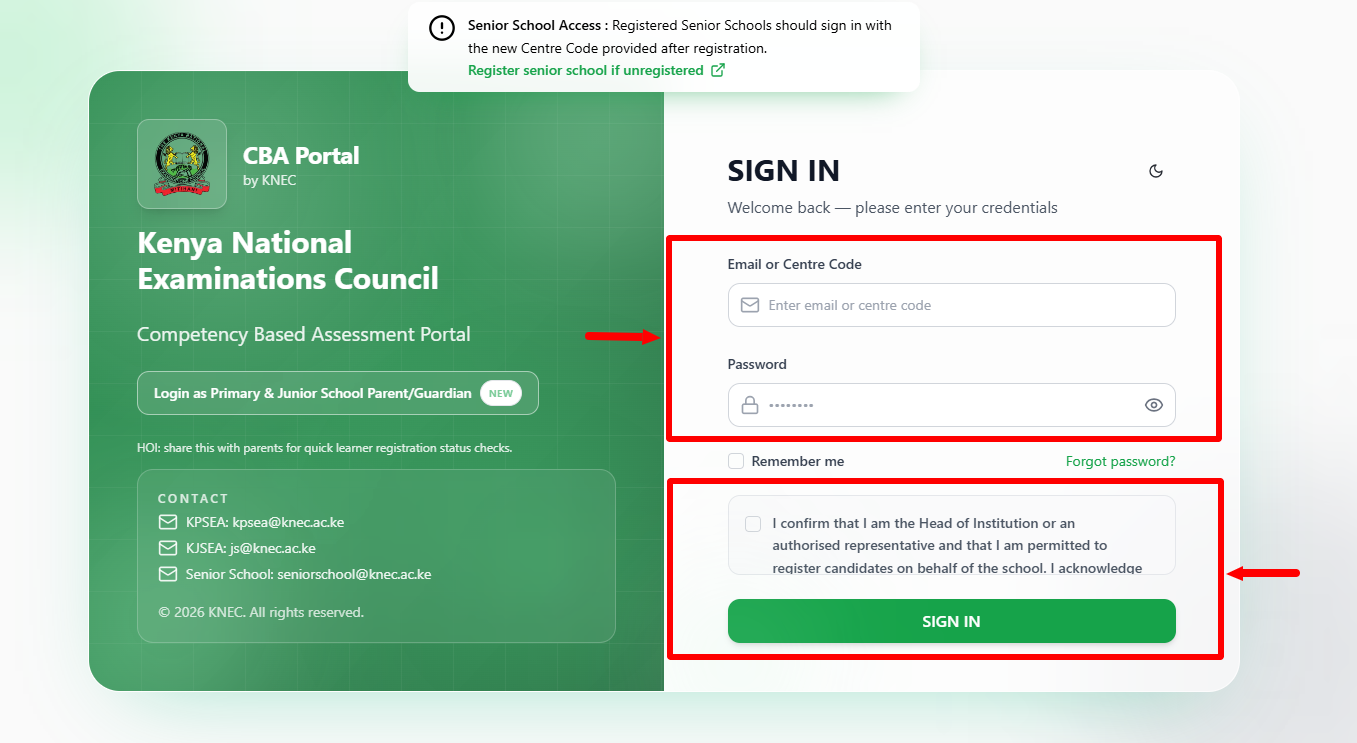
Lastly, click on the KNEC CBA Portal Password reset link that has been sent to your email address, which will direct you to setup a new password for your CBA Portal account. Once you have updated or changed your password you can now proceed and log in to your CBA Portal account using your Centre Code or SCDE Code and the new CBA Portal Password that you have set for your account.
Frequently Asked Questions About KNEC CBA Portal Password Reset
- 1. How can I reset my KNEC CBA Portal Password?
You can reset your KNEC CBA Portal Password by visiting the official KNEC CBA Portal and clicking Forgot Password. Enter your Centre Code/SCDE Code, complete the OTP Verification, and use the Password Reset Link sent to your registered email address to create a new password.
- 2. What do I need to reset my KNEC CBA Portal Password?
To reset your KNEC CBA Portal Password, you need your Centre Code/SCDE Code, Registered Phone Number, and Email Address. The phone number is used to receive the OTP, while the registered email address is used to receive the password reset link.
- 3. Where can I reset my KNEC CBA Portal Password?
You can reset your password through the official KNEC CBA Portal. From the login page, click Forgot Password to access the password recovery process and follow the instructions provided by the portal.
- 4. How do I verify my KNEC CBA Portal account during password reset?
During the KNEC CBA Portal Password Reset process, a 6-digit OTP Verification code is sent to your registered phone number. Enter the OTP on the portal and click Continue to verify your account and proceed with the password reset process.
- 5. Where is the KNEC CBA Portal Password Reset Link sent?
After completing the OTP verification, the KNEC CBA Portal Password Reset Link is sent to the email address registered on your CBA Portal account. Check your registered email, open the link, and follow the instructions to set up your new password.
- 6. Can I log in to KNEC CBA Portal after resetting my password?
Yes. After successfully setting a new KNEC CBA Portal Password, you can log in to your CBA Portal account using your Centre Code or SCDE Code together with the new password you have created.
Overview: KNEC CBA Portal Password Reset
To begin, visit the official KNEC CBA Portal and click Forgot Password to access the password recovery process. Enter your Centre Code/SCDE Code in the required field and proceed with the verification process. An OTP will be sent to your registered phone number, which you need to enter to verify your account and continue with the password reset.
READ ALSO: How To Log In To KNEC E-Certificate Platform
After completing the OTP Verification, proceed to reset your KNEC CBA Portal Password as instructed. Check the registered email account for the Password Reset Link, open the link, and follow the instructions to create a new password. Once the new password has been successfully set, you can use it to log in to your KNEC CBA Portal account.