
KRA Form C20 is an official Kenya Revenue Authority (KRA) customs document used in connection with the application for a Customs Agents Licence. The form is titled Application for Customs Agents License and is issued under Regulation 149(1) of the East African Community Customs Management Regulations. It contains sections for providing information about the applicant, business structure, directors or partners, previous licencing, customs clearance experience, bankers, capital and employees.
This guide explains How To Download KRA Form C20 from Kenya Revenue Authority website. Instead of searching for the form on third-party websites, you can use the KRA website to locate the official Customs Agents License Application Form C20 and download the document to your device. The process involves visiting the KRA website, opening the Publications section, searching for Form C20, locating the relevant KRA Form C20 result and downloading the form for use.
READ ALSO: How To Download KRA M-Service App
What is KRA Form C20?
KRA Form C20 is the application form used for a Customs Agents Licence. The official form is headed Application for Customs Agents License and provides fields where an applicant can give details required for the customs agent licensing process. The form asks for information such as the applicant’s name and KRA PIN Number or Tax Identification Number (TIN), registered address, business structure, names and details of directors or partners, whether the application is new or a renewal, previous licence information and customs clearance experience.
The form also contains sections relating to the applicant’s bankers, authorised capital, paid-up capital, employees and their citizenship, as well as information about previous appeals for licensing. At the end of the form, the applicant is required to make a declaration that the particulars provided are true and correct, followed by the signature, title and date. Where the space provided on Form C20 is insufficient, the form states that a separate sheet may be attached.
What is KRA Form C20 Download?
KRA Form C20 Download refers to the process of obtaining the official Customs Agents License Application Form C20 from the Kenya Revenue Authority website and saving it to your device. The form is available through the KRA website’s publications/downloads resources, where KRA currently lists Customs Agents License Application Form C20 among its downloadable documents.
Downloading KRA Form C20 allows you to obtain the official document in a digital format that you can open and use when preparing a Customs Agents Licence application or renewal. KRA’s customs information confirms that Form C20 is the prescribed licence renewal form, while current KRA notices also identify a duly filled Form C20 as one of the documents required for Customs Agents Licence applications or renewals.
Requirements Needed To Download KRA Form C20
To Download KRA Form C20, you need access to an internet-enabled device such as a smartphone, tablet or computer and a web browser that can access the Kenya Revenue Authority website. You also need a stable internet connection so that you can open the KRA website, access the Publications section, search for the form and download the document to your device.
You do not need to complete a KRA account login simply to locate and download the publicly available Form C20 from the KRA website. The important requirement is having access to the internet and a suitable device that can open and save the downloaded document. If you intend to use the form for a Customs Agents Licence application or renewal, however, you should separately check the current KRA licensing requirements and supporting documents because downloading Form C20 is only one part of the overall licensing process. KRA’s current information lists Form C20 among the documents required for customs agent licence processes.
How To Download KRA Form C20
To Download KRA Form C20, you need to access the official Kenya Revenue Authority website and use the website’s Publications section to locate the form. KRA currently lists Customs Agents License Application Form C20 as a downloadable publication, making the KRA website the appropriate place to find the official document. The process involves searching for the form using the term Form C20, opening the relevant search result and downloading the document to your device.
Before downloading the document, make sure that you select the correct KRA Form C20 result rather than another customs form. KRA publishes several customs forms, including Forms C21, C25 and other C-series documents, so using the form title Customs Agents License Application Form C20 helps you identify the correct document. Follow the steps below to Download KRA Form C20 from the official KRA website.
- Step 1: Visit KRA website
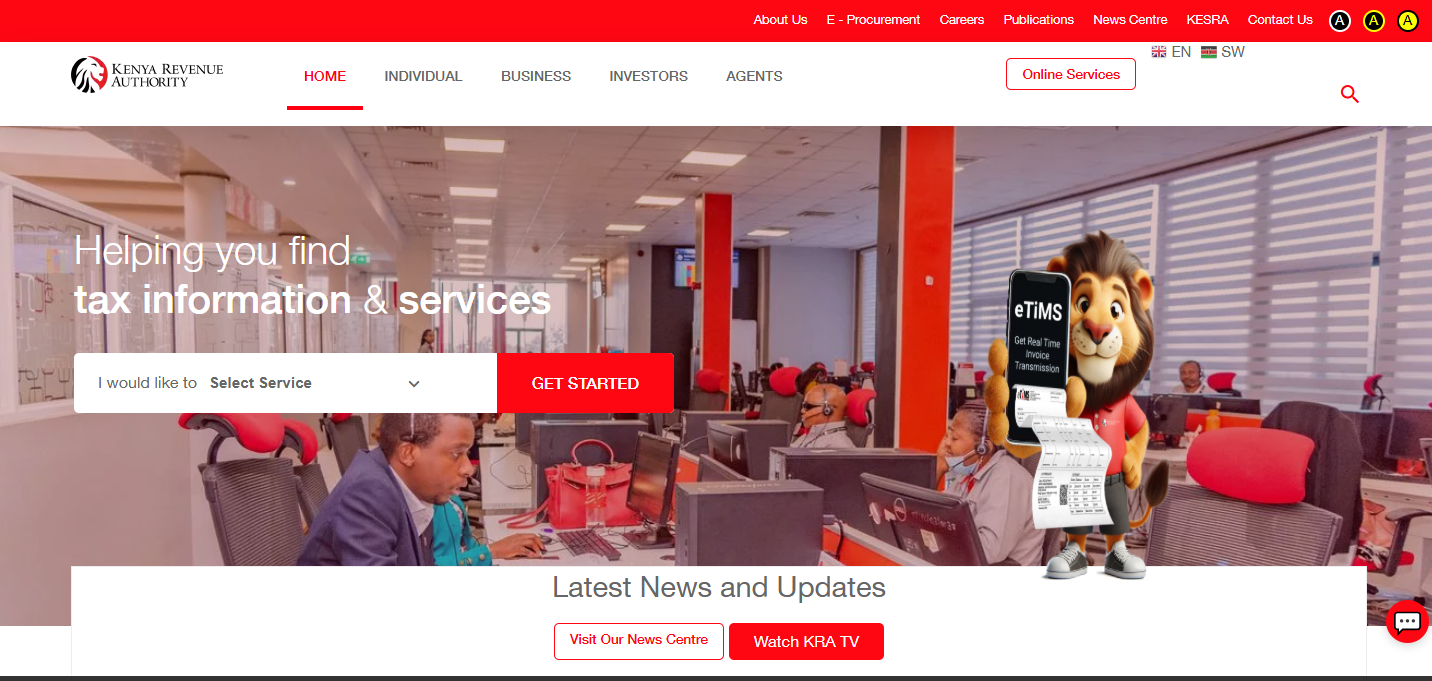
Open your preferred web browser and visit the official Kenya Revenue Authority website at www.kra.go.ke. Once the KRA website loads, you can access the different tax, customs and other services and information provided by the Authority. To find Form C20, proceed to the section where KRA publishes downloadable forms and other official documents.
- Step 2: Click Publications
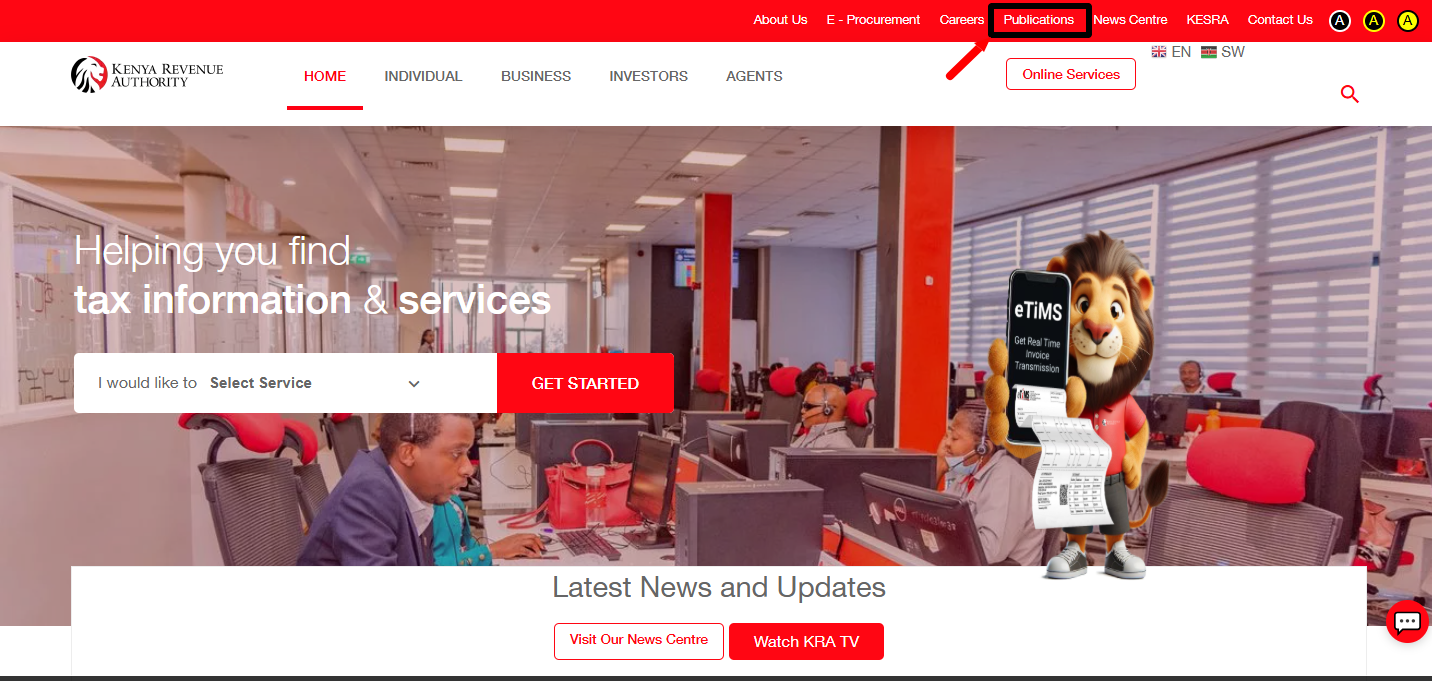
On the KRA website, click Publications to access the section containing documents and other materials published by the Kenya Revenue Authority (KRA). The Publications section provides access to different KRA documents, including downloadable forms and customs-related publications.
- Step 3: Enter Form C20
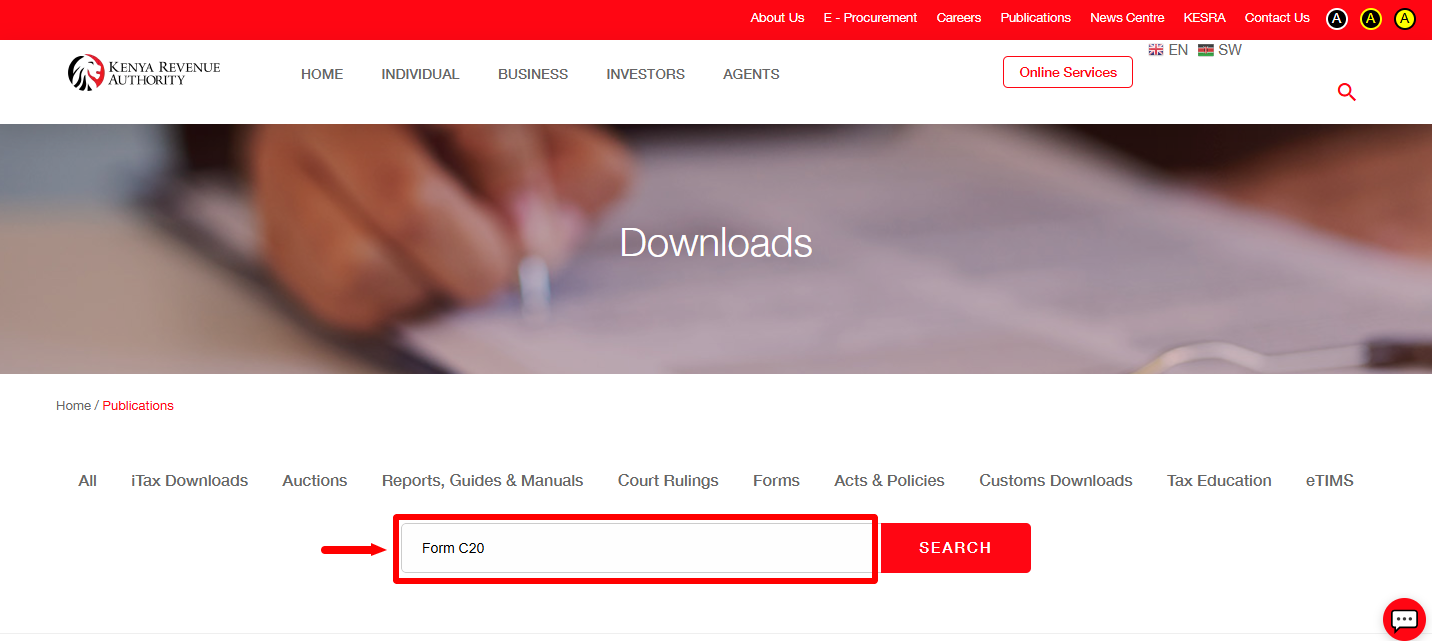
In the search section within the KRA publications area, enter Form C20 as your search term. Using the form number helps narrow the search results and makes it easier to locate the official Customs Agents License Application Form C20 among the other documents available on the KRA website.
- Step 4: Click Search
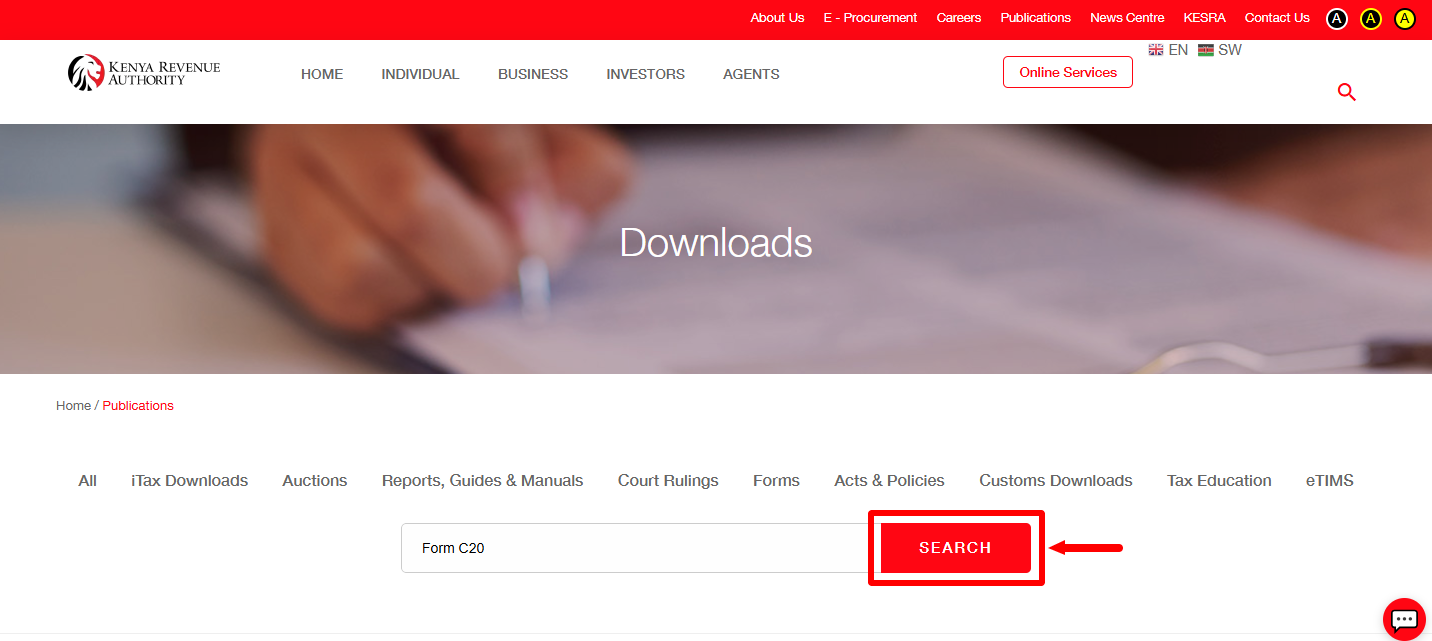
After entering Form C20, click Search to submit your search and display the matching KRA publications. Look through the results for Customs Agents License Application Form C20, which KRA currently lists as a downloadable document.
- Step 5: Download KRA Form C20
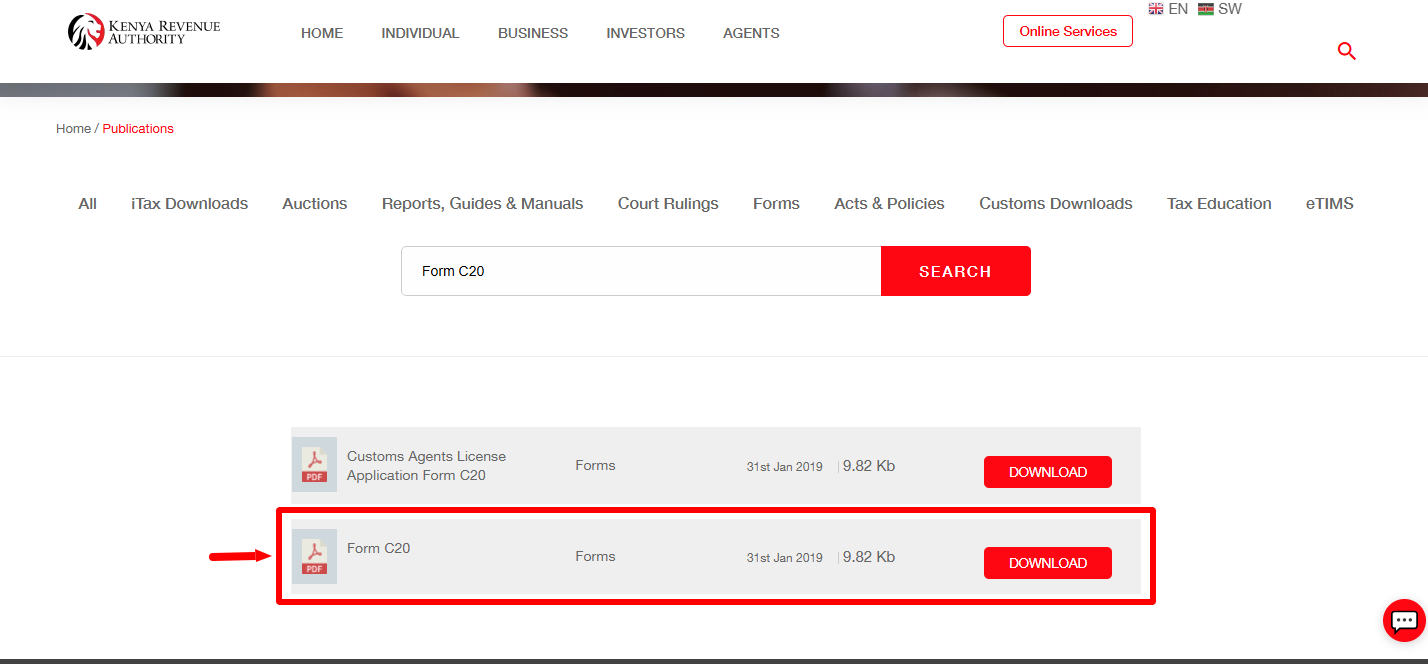
Once you locate Customs Agents License Application Form C20 in the search results, select the form to open or download the official document. Save the downloaded KRA Form C20 to your smartphone, tablet or computer so that you can access it when needed and print a copy of the Form C20, fill it and submit for processing of your Customs Agents Licence in Kenya. The official form contains the fields required for a Customs Agents Licence application, including applicant, business, directors or partners, customs experience, capital and employee information.
Download: KRA Form C20
KRA Form C20 Download
To Download KRA Form C20, start by visiting the official KRA website and opening the Publications section. Search for Form C20 and click Search to display the relevant publications. From the search results, identify Customs Agents License Application Form C20, which KRA currently lists as an official downloadable document. Selecting the correct result allows you to access the official KRA Form C20 rather than relying on a copy from another website.
READ ALSO: How To Reset eTIMS Password
After locating the correct document, download KRA Form C20 and save it to your device for future use. The form is the Application for Customs Agents License and contains sections for the information required as part of the customs agent licensing process. If you are downloading the form for an actual licence application or renewal, remember that the downloaded Form C20 is part of the broader customs licensing process and that KRA may require additional supporting documents depending on whether the application is new or a renewal.